If you are looking to register with bOnline for the first time, or if you are an existing customer who wants to register a new email address, please follow the steps below.
How to register
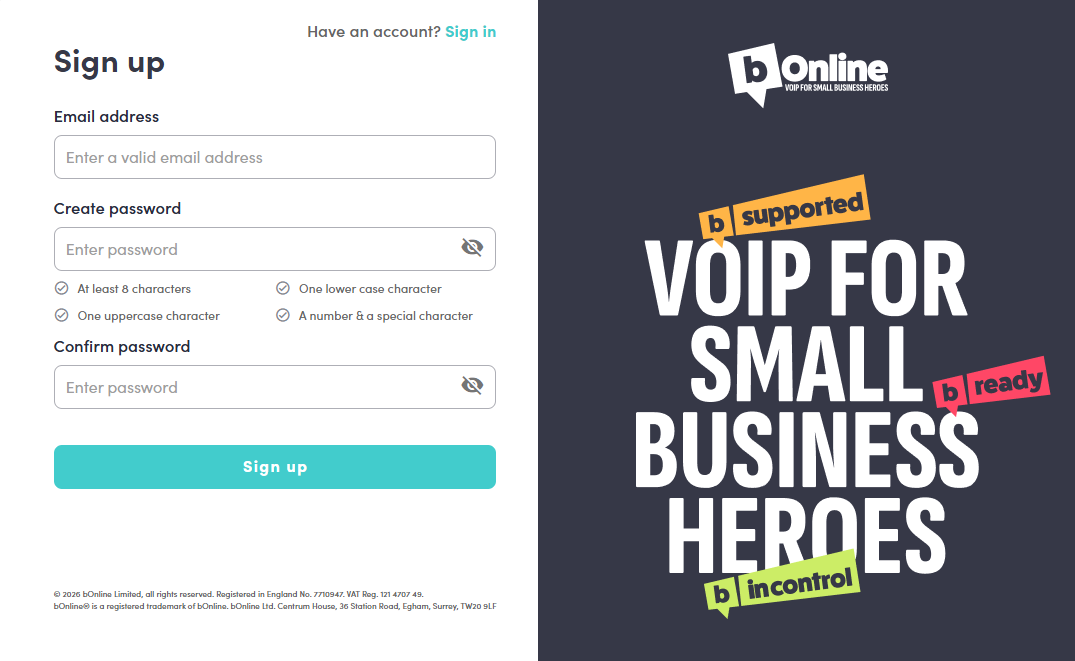
- Click on the following link to access the registration page: Sign up for MybOnline
- Enter your email address.
- Create a password and confirm it. Your password must meet the following requirements:
- At least 8 characters
- One uppercase character
- One lowercase character
- A number and a special character
- Click the Sign up button.
- Once registered, return to the login page and sign in using your new email address and password
Related articles
How to log in to the MybOnline portal
Forgot your MybOnline login password?
Contact Us
We're always up for a chat! Live chat is available via the mybOnline sidebar or from the bottom-right corner of this page.
Note: This is the fastest way to reach the support team.
Other Contact Options
WhatsApp
Reach the support team via WhatsApp for quick queries.
mybOnline Portal
Log in to mybOnline and use the in-portal contact options.
Was this article helpful?
That’s Great!
Thank you for your feedback
Sorry! We couldn't be helpful
Thank you for your feedback
Feedback sent
We appreciate your effort and will try to fix the article