Having your account suspended can feel stressful, but in most cases it can be resolved quickly once the issue is addressed. This article explains why suspensions happen and what steps to take to restore your account.
How will you know your account is suspended?
You will be notified of a suspension in one of two ways:
- You will receive an email or text message stating that your account has been suspended.
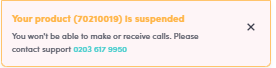
- You will see a suspension banner when you log in to your MYbOnline account.
What causes an account to be suspended?
Accounts are typically suspended for one of two reasons:
- Failed payments — your Direct Debit payment has not been collected successfully.
- Identity verification failure (KYC) — your identity could not be confirmed through the KYC check.
Failed payments
First payment failure
If your first scheduled Direct Debit payment fails, your account will be suspended automatically. This typically happens when the bank details provided are incorrect or when there are insufficient funds at the time of collection.
History of failed payments
If there is a pattern of failed payments on your account, this may also result in a suspension. This can occur when:
- Multiple Direct Debit collections have been returned unpaid.
- A previous payment arrangement has not been honoured.
Once your outstanding balance has been paid in full, your account suspension will be lifted automatically — there's no need to contact us for this. If you're unable to make payment, or your account is still suspended after paying, contact the bOnline support team through Live Chat or WhatsApp for help.
Identity verification failure (KYC)
KYC (Know Your Customer) is a compliance check used to confirm your identity. During this process, bOnline will send you a link where you verify your identity by uploading a copy of your ID document (such as a passport or driving licence).
If the KYC check fails, your account will be suspended until verification is completed. Common reasons for KYC failure include:
- The uploaded ID document was unclear or expired.
- The details on the ID did not match the information provided during sign-up.
- The verification link expired before it was completed.
Please note: Once your ID verification is successfully completed, it can take up to 5 minutes for your service to go live automatically — you do not need to contact us for this.
What to do if you have failed KYC
If your KYC verification attempt was unsuccessful, contact the bOnline support team through Live Chat (available on the right-hand side of this page) or via WhatsApp. The team will help you complete verification and restore your account.
Related articles
Was this article helpful?
That’s Great!
Thank you for your feedback
Sorry! We couldn't be helpful
Thank you for your feedback
Feedback sent
We appreciate your effort and will try to fix the article