Ethernet cables provide a wired connection between your router and your devices. Using the right cable can improve network speed and reliability compared to Wi-Fi alone. This article explains the different cable types and how to choose the right one for your setup.
Cable Categories
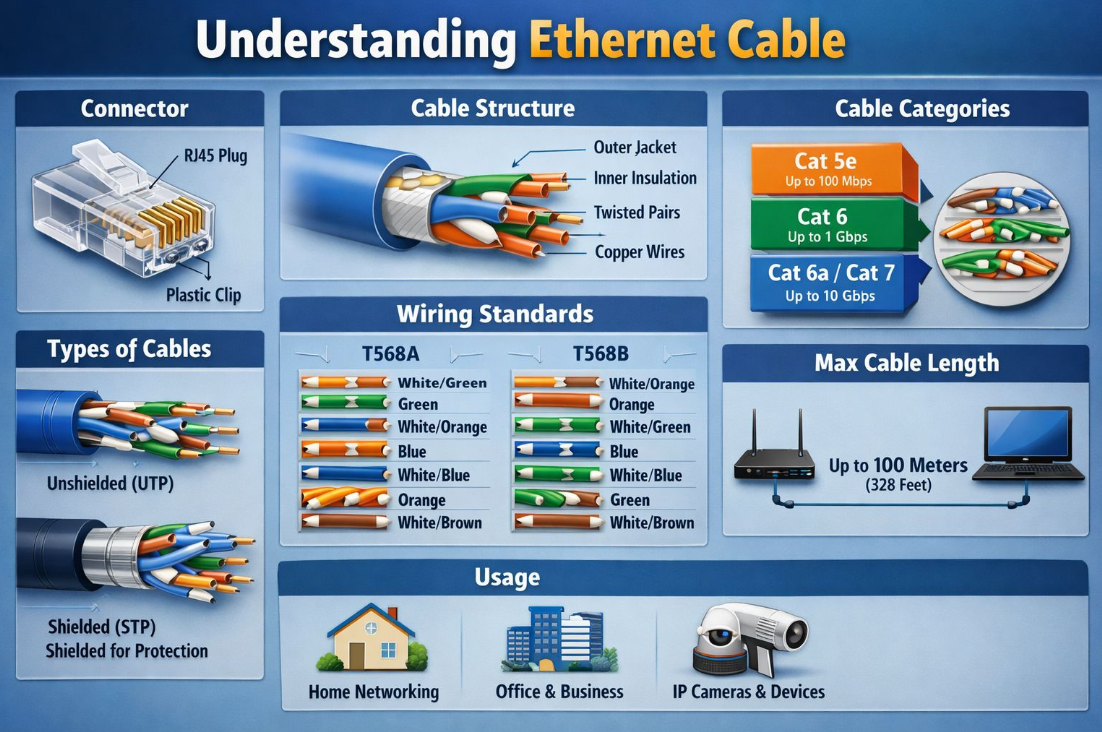
Ethernet cables are grouped by category, which determines the maximum speed they support:
- Cat 5e: supports speeds up to 100 Mbps. Suitable for basic broadband connections.
- Cat 6: supports speeds up to 1 Gbps. Recommended for most business setups.
- Cat 6a / Cat 7: supports speeds up to 10 Gbps. Used for high-performance or future-proofed networks.
Cable Types
- Unshielded (UTP): the most common type, suitable for standard office and home networking environments.
- Shielded (STP): includes additional shielding to reduce electrical interference. Used in environments with heavy equipment or long cable runs.
Maximum Cable Length
Ethernet cables support a maximum run of up to 100 metres (328 feet). Beyond this length, the signal may weaken and cause connection issues.
Common Uses
- Connecting your bOnline broadband router to a computer or Yealink handset
- Office and business networking
- IP cameras and security devices
Related Articles
Was this article helpful?
That’s Great!
Thank you for your feedback
Sorry! We couldn't be helpful
Thank you for your feedback
Feedback sent
We appreciate your effort and will try to fix the article