Assigning a phone number ensures your team members can make and receive calls through your business phone system. This guide explains how to link a specific number to a user within your MYbOnline portal.
Before You Start
Ensure you have administrative access to the MYbOnline portal.
Verify that you have available unassigned numbers or licenses in your account.
Steps to Assign a Phone Number
Log in to the MybOnline portal.
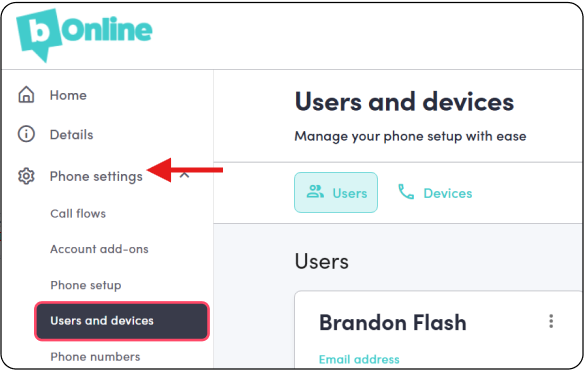
Click Phone Settings > Users and Devices
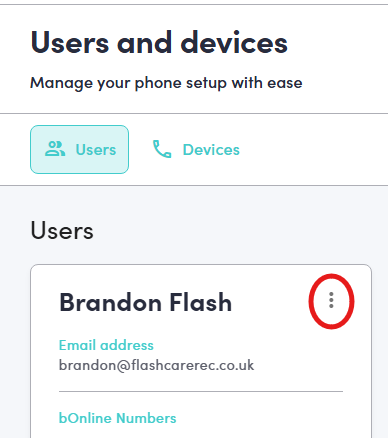
Click the Three Vertical Dots (more options menu) on the right side of the user card.
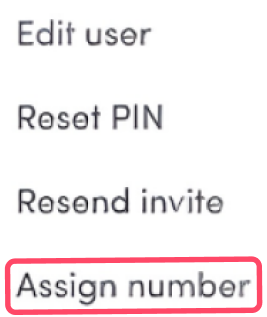
4. Select Assign number from the dropdown list.
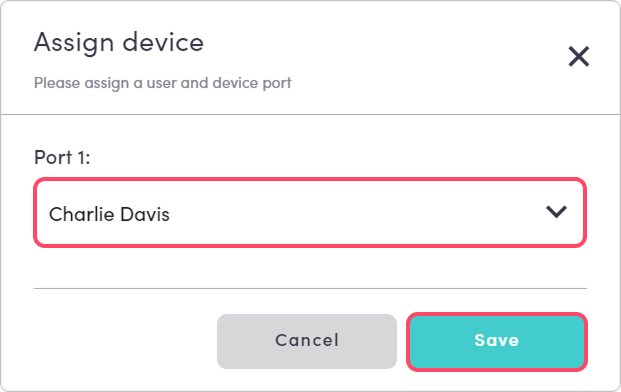
5. In the ‘Assign Device’ window, select the correct user from the dropdown menu to receive the number.
Was this article helpful?
That’s Great!
Thank you for your feedback
Sorry! We couldn't be helpful
Thank you for your feedback
Feedback sent
We appreciate your effort and will try to fix the article