Updating a user’s PIN ensures your team can always access their bOnline apps and voicemail securely. This guide explains how to reset a PIN directly from your MybOnline portal.
Before You Start
Ensure you have administrative access to the MybOnline portal.
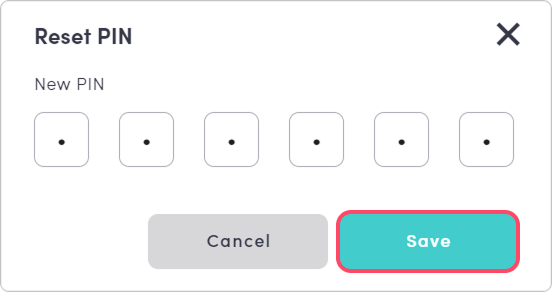
Have the new six-digit PIN ready to enter.
Steps to Reset a User PIN
Log in to the MybOnline Portal
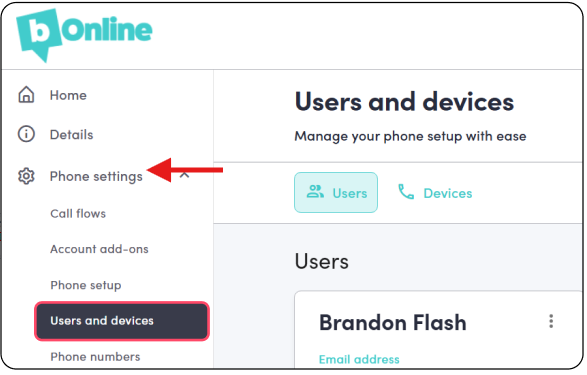
Click Phone Settings > Users and Devices
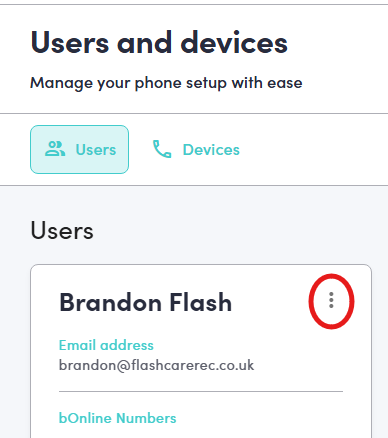
3. Click on the three vertical dots (more options menu) next to the relevant User Name.
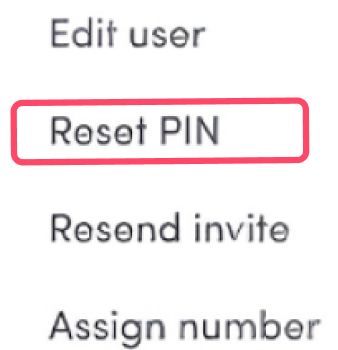
4. Click on Reset Pin from the dropdown list.
5. Enter Your New Pin and Save
The user can now access the bOnline desktop and mobile apps using their newly created PIN.
Was this article helpful?
That’s Great!
Thank you for your feedback
Sorry! We couldn't be helpful
Thank you for your feedback
Feedback sent
We appreciate your effort and will try to fix the article